v2.1 · Windows 10/11 (64-bit)

The easy way to edit your hosts file — with privacy protection and parental controls built in.

HOTS Hosts is a free, open-source hosts file editor for Windows — dark or light theme, backups, diagnostics, and fine-grained control over Windows telemetry.
GPLv3 · free & open source 🔒 No data collected · no ads Python 3.10+ Fluent Design EN · PL · FR · DE · ES
# admin rights required to save · Windows will ask for confirmation on first run
👤 Built and maintained by one person, in spare time
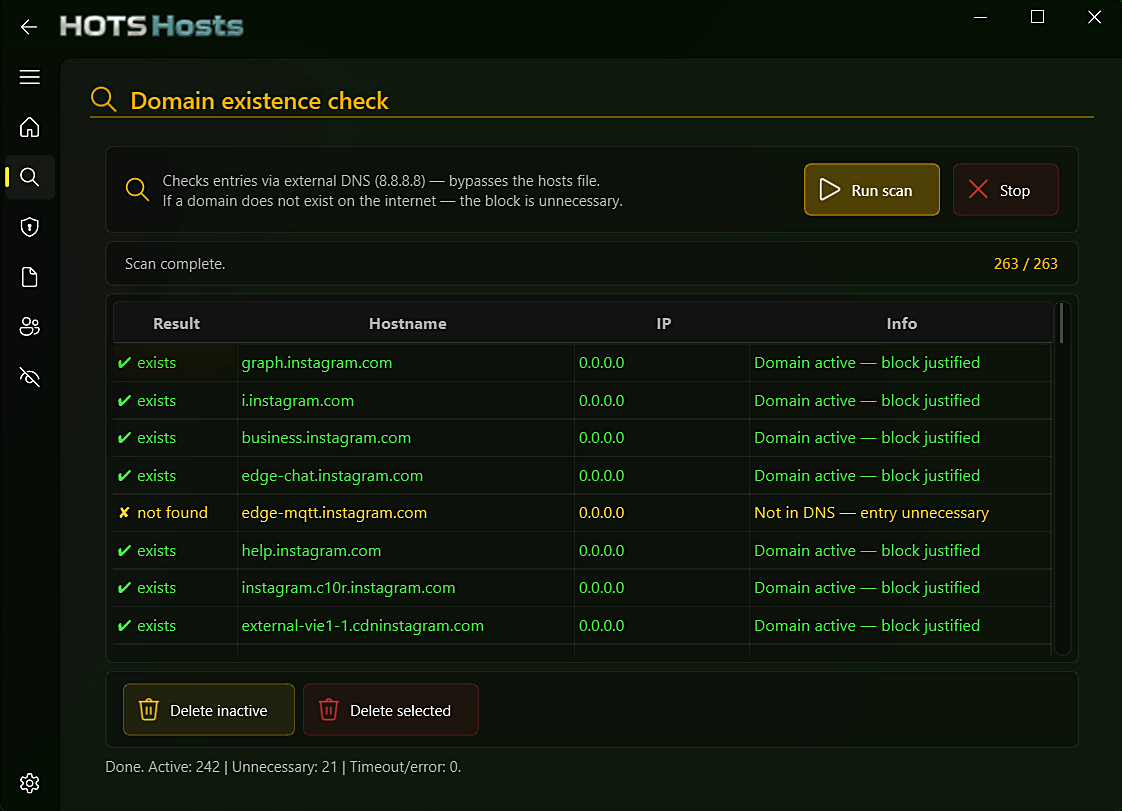
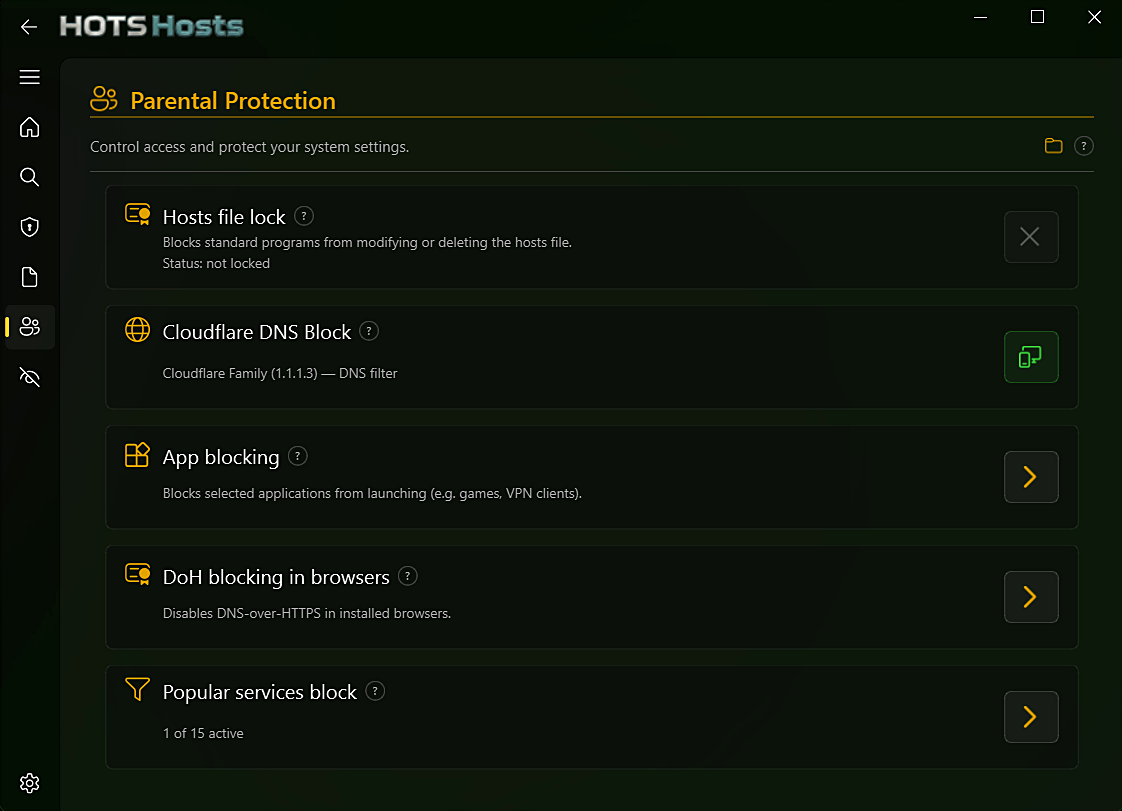
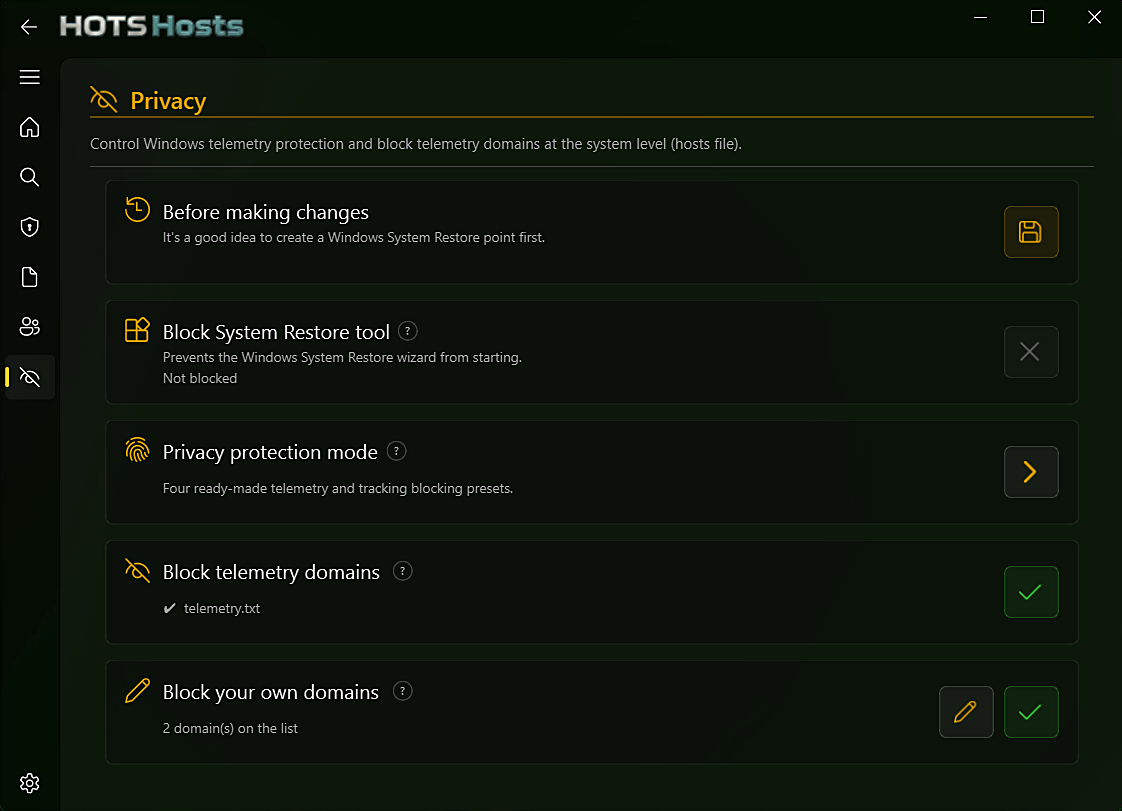
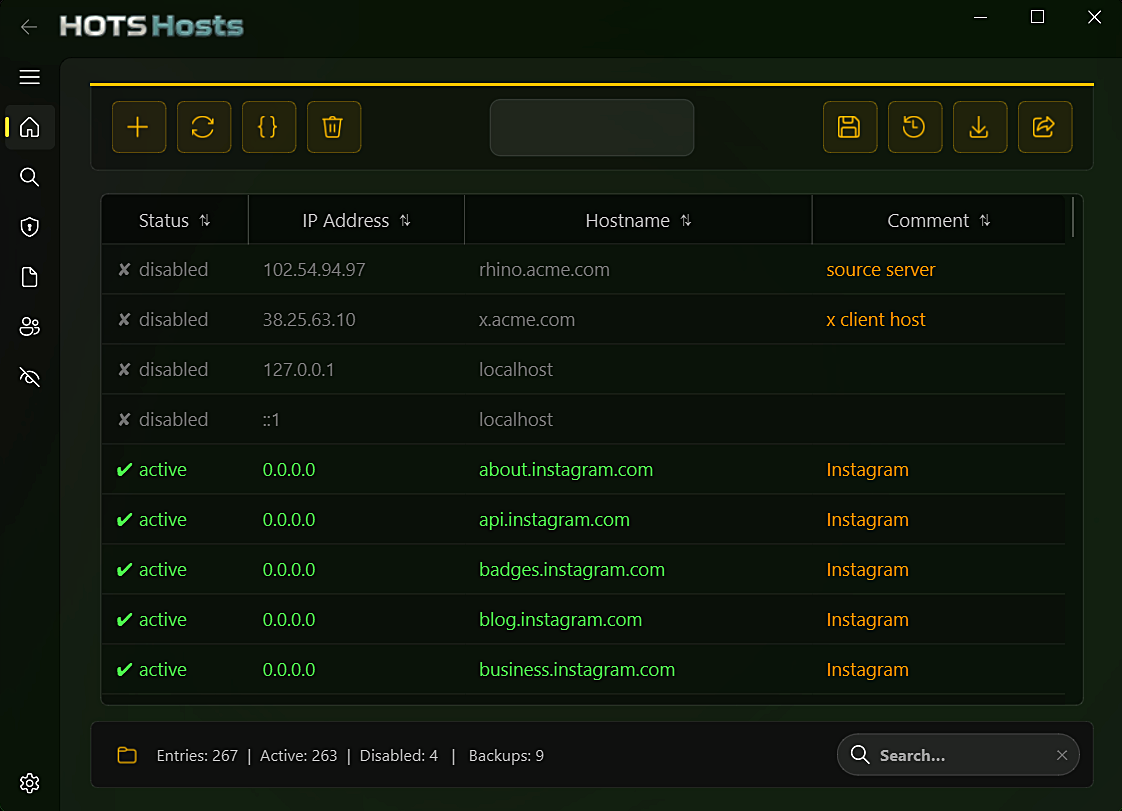
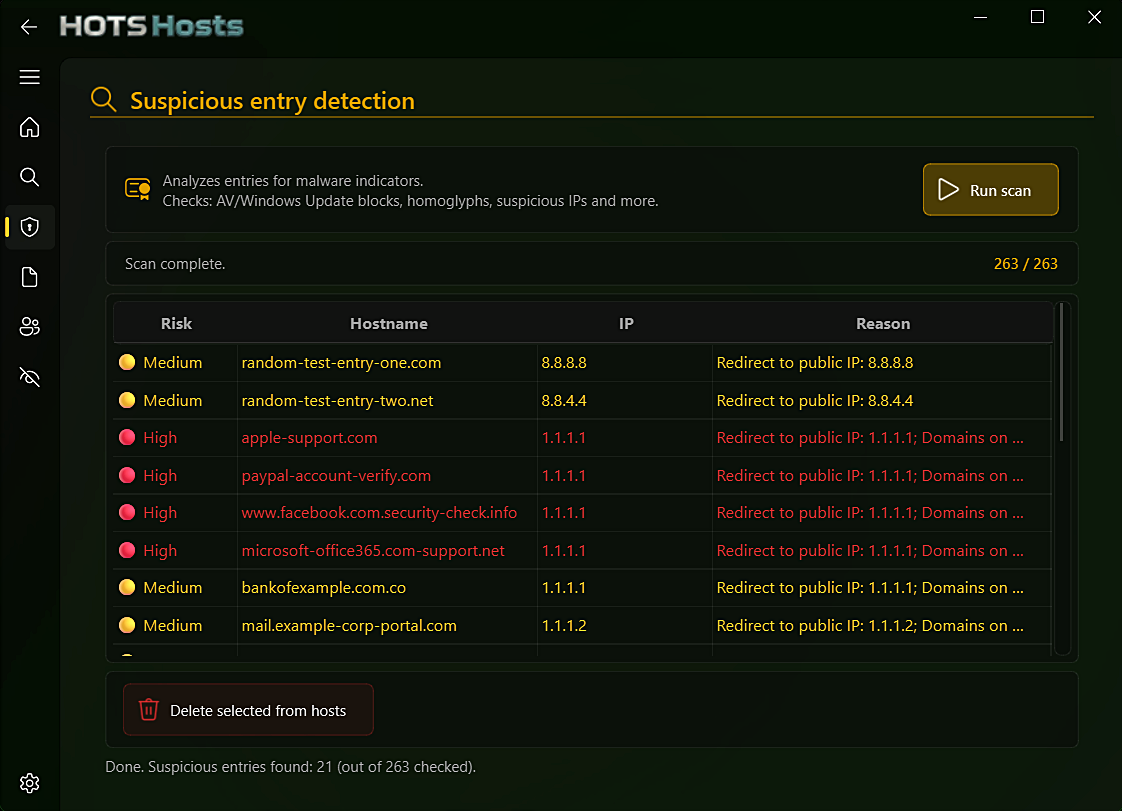
HOTS Hosts — main table view HOTS Hosts — Diagnostics, malware scanner HOTS Hosts — Diagnostics, domain existence check HOTS Hosts — Parental Control blocklist categories HOTS Hosts — Privacy module with tiered telemetry protection

Main table — toggle, sort, and search thousands of entries at once

# what's inside

Four modules, one clean app

HOTS Hosts isn't just a table editor — it bundles the tools people actually reach for around the hosts file.

Core Editing & Safety

Everything you'd expect from a proper table editor, plus a safety net under every save.

  • Toggle, don't delete — flip an entry off without losing it
  • Bulk paste multiple "IP hostname" lines at once, with column sorting and live search
  • Auto-backup before every save — rotating archive of the last 15, browsable in the Backup Manager
  • Diff preview before writing, plus post-save verification
  • Import/export to .txt or .csv, with a 20,000-entry cap to protect the Windows DNS Client

Diagnostics

Catches the entries that are quietly broken or actively dangerous.

  • Domain existence check — queries Google/Cloudflare public DNS directly and in parallel, bypassing your local hosts file
  • Malware scanner — a heuristic engine covering well over a dozen risk signals:
    redirected system/payment domains blocked Windows Update / AV redirect to public IP mass-redirect patterns raw-IP hostnames Unicode homoglyphs zero-width characters Punycode hostnames DGA-style domains fuzzy-matched typosquatting
  • Known-safe subdomains and CDNs are auto-whitelisted, plus a per-entry ignore list so confirmed-safe results stop reappearing

Parental Control

Blocklists for 15 categories — adult content, social apps, games, torrents, dating, random video chat, and more — each in its own tagged section so toggles never collide.

  • One-click Cloudflare Family DNS (1.1.1.3 / 1.0.0.3) across all active network interfaces, detected natively and instantly — no subprocess spawned
  • DNS settings backed up per interface and restored automatically when disabled; protection persists across sessions
  • 🔒 Hosts file lock (new) — denies write/delete access to the hosts file at the Windows permission level, so blocklists can't be edited from outside the app
  • 🚫 Application & VPN client blocking (new) — stops specific programs, or a curated list of 10 popular VPN clients, from launching at all (IFEO + ACL), with a watchdog that flags any tampering
  • 🔐 DNS-over-HTTPS blocking (new) — closes the browser-level DoH bypass system-wide via managed-browser policy in Chrome, Edge, Brave and Firefox, so it can't be re-enabled from inside the browser
Known limitations

Large platforms rotate through hundreds of CDN subdomains, so a blocklist is never 100% complete — built-in lists are updated with each HOTS release to keep up, and you can add stragglers yourself via the main table or the Block your own domains list under Privacy. Phones, tablets, and traffic tunneled through a VPN service still aren't covered. Application & VPN client blocking is scoped as a deterrent against casual bypass attempts — not protection against a technically sophisticated attacker.

Privacy

Rebuilt from a single on/off switch into a tiered control center — 37 individual system tweaks across four levels.

  • Basic (13 tweaks) — telemetry policy, DiagTrack & dmwappushservice services, advertising ID, Bing/search suggestions, Recall, feedback, CEIP
  • Medium (12 tweaks) — firewall rules (CompatTelRunner, devicecensus, WerFault) and 9 scheduled tasks (Appraiser, Consolidator, UsbCeip…)
  • Advanced (5 tweaks) — WerSvc / PcaSvc services, Activity Feed, cross-device activity sync
  • Privacy+ (7 tweaks) (new) — location service, handwriting/text input collection, personalization, cross-device clipboard, Find My Device
  • 📡 Known telemetry domains — the hosts-file blocklist toggle formerly under Parental Control lives here too
  • 🩹 Drift detection — flags any setting Windows silently resets, one click to re-apply
  • 🛟 System Restore integration — one-click restore point, plus removing Windows' restore-frequency limit if it's blocking you
  • 🚫 Block System Restore tool (new) — stops rstrui.exe from running, closing an easy way to undo parental controls system-wide
  • 📝 Block your own domains (new) — a free-text blocklist for anything the built-in categories miss, stored separately so it survives a hosts restore or uninstall
🌗 Dark & Light themes — switch anytime in Options 🎨 4 accent colors — Gold, Red, Green, Blue 🔄 Built-in update checker — pulls the latest release from GitHub 🔑 Password protection — required to open the app and to uninstall it 📝 Raw text view with syntax highlighting 🔧 Auto-repair — dedupes and fixes malformed lines 🧹 Restore Microsoft default (backed up first)
# changelog

What's new in 2.1

Version 2.0 rebuilt the app in Fluent Design. 2.1 adds a set of real enforcement tools on top of it.

🔒
Hosts file lock — denies write/delete access to the hosts file so blocklists can't be edited from outside the app.
🚫
Application & VPN client blocking — stop specific programs, or a curated list of 10 popular VPN clients, from launching at all.
🔐
DNS-over-HTTPS blocking — closes the browser-level DoH bypass system-wide in Chrome, Edge, Brave and Firefox.
🕵️
Privacy expanded to 37 tweaks across four levels, with a new Privacy+ tier, a Block System Restore tool, and a free-text custom domain blocklist.
💘
15 Parental Control categories — added dating sites and random video chat.
🔑
Password-protected uninstaller — the same password required to open the app is now also required to remove it.
🌐
2 new languages — Deutsch and Español, alongside English, Polski, and Français.
# what's next

One tool today. More on the way.

HOTS Hosts is the first release under HOTS Tools — Handy OS Tools Suite, a small line of no-nonsense Windows utilities. The next ones are still taking shape.

● available — v2.1

HOTS Hosts

Edit, back up, diagnose, and lock down your Windows hosts file — with parental controls and a telemetry blocker built in.

○ in planning

HOTS Uninstaller

Soon.

○ idea stage

Utility #3

Reserved for whatever small, annoying problem needs solving next.

# faq

Questions people actually ask

Will this slow down my PC or internet?
Generally no — HOTS Hosts itself doesn't run as a background service or monitor your traffic. The one honest exception is the hosts file itself: Windows' own DNS Client service loads the whole file into memory, so an extremely large one (tens of thousands of entries) can genuinely slow down or even hang DNS lookups. That's why HOTS Hosts enforces a 20,000-entry safety limit and blocks saves beyond it — for anything under that, you won't notice a difference.
Is any of my data collected or sent anywhere?
No. There's no telemetry, no analytics, no account, and no ads. The only network requests HOTS Hosts makes are the ones you trigger yourself — checking a domain, running the malware scanner, or checking for app updates.
Will VPN client blocking affect a VPN I use myself?
Only if you specifically enable it. It's off by default and, when turned on, only blocks a curated list of 10 well-known consumer VPN clients — not VPN protocols in general, and not anything your workplace or router might use.
Will DNS-over-HTTPS blocking break my browser?
No. It only turns off the encrypted DNS-over-HTTPS bypass feature in Chrome, Edge, Brave and Firefox — normal browsing keeps working exactly the same, just resolved through the regular system DNS (and hosts file) instead of around it.
Does it work on Windows 7, 8, or 32-bit systems?
No — HOTS Hosts requires Windows 10 or 11, 64-bit.
Is it actually open source, or just "source available"?
Fully open source under GPLv3 — the entire codebase is public on GitHub, so you (or anyone) can read exactly what it does before trusting it with Administrator rights.
# get started

Two ways to run it

Grab the .exe if you just want it working, or build from source if you'd rather verify the code first.

Option A — Run the installer (recommended)

  • 1Download HOTS_Hosts_setup.exe from the Releases page
  • 2Double-click — UAC will prompt for Administrator rights
  • 3Follow the setup wizard. Done. No further setup required.
About the SmartScreen warning

HOTS Hosts is a small independent project without a paid code-signing certificate, so Windows SmartScreen may warn that it "isn't commonly downloaded." That's expected for any new unsigned .exe — it doesn't mean the file is unsafe. Click More info → Run anyway, or build from source yourself if you'd rather verify first.

Option B — Run from source

Administrator: Command Prompt
$ pip install PySide6 "PySide6-Fluent-Widgets[full]"
$ git clone https://github.com/darsono6/HOTS.git
$ cd HOTS
$ pythonw -m hosts_editor
✓ launching HOTS…

Requires Python 3.10+, PySide6 and PySide6-Fluent-Widgets. Must be run as Administrator — the hosts file is write-protected by Windows.

❤️ Support the project

"Hi, I'm Darsono. HOTS Hosts is a project I build in my free time, completely free of charge. If you enjoy it and it makes your work easier — or maybe you're just having a good day — you can support its development. I'll be truly grateful for any amount, even a small one."

HOTS Hosts is a personal hobby project, released free under GPLv3. If it saves you time or you just want to say thanks, any amount is appreciated — no registration required.

📄 License & disclaimer

Released under the GNU GPLv3. Provided in good faith but without any warranty — modifying the hosts file affects system-level network resolution, so use with care. You use this software at your own risk.

© 2026 Darsono

Get HOTS Hosts and get started.

Free and open source, released under GPLv3. No data is collected or sent anywhere, and there are no ads.